
I purchased an upgrade but PianoMeter just reverted to the Free version.
This sometimes happens when something deletes or resets the app’s internal data that tells it that it’s been unlocked in the past. It can also happen when you switch devices (see below) and it tends to happen more often on iOS than on Android.
There is not a one-size-fits-all solution to this problem, but here are some steps you can take (in order of increasing difficulty) that often help restore the purchase.
- Make sure your device has an internet connection.
- Open the Menu and select “Upgrade” at the bottom. On iOS, scroll to the bottom and click “Restore purchases”. On Android, just back out of the menu, because just opening the Upgrade page performed the “restore purchases” action.
- Force close the app. (Usually involves swiping up from the bottom, then swiping away the card of the app.) Re-open the app, and repeat step 2 if it’s still locked.
- Restart your device. Then open the app, and repeat step 2 if it’s still locked.
- Make sure you’re logged into your device using the same Google or Apple account that you used when you first made your purchase. You can see what account you’re logged into in your device settings or in the Google Play Store or Apple App Store apps.
- Uninstall PianoMeter, then re-install. Be aware that this will probably delete any saved tuning files you may have on your device that are not backed up elsewhere. Repeat Step 2.
If all of the above fail, please contact me by email at [email protected] and I’ll see what I can do to help.
How do I transfer my purchase to a new device?
In-app purchases in PianoMeter are linked to your email/account with Google or Apple, not to any device. PianoMeter can be installed/unlocked on as many devices as you own and are logged in on. If PianoMeter doesn’t unlock on its own when you first open the app, you can force a license check by visiting the Upgrade page (requires an internet connection). On iOS there is also a button at the bottom of the Upgrade page to “Restore purchases”. On Android the license check happens automatically.
I bought PianoMeter on Android. Can I transfer my license to iOS?
Unfortunately, no. In-app purchases on Android and iOS are linked exclusively to your Google or Apple accounts. There are multiple reasons I can’t transfer a license from Android to iOS or vice versa.
- Apple and Google don’t play nice with each other, and it’s explicitly against their terms of service for me to unlock functionality on one platform for payments on a different platform.
- The Android and iOS apps really are different products. Both are the result of separate long and expensive development process, and both need separate ongoing maintenance.
- There are also technical limitations that prevent me from manually verifying purchases on both platforms and giving refunds. I have very limited access to the financials (especially on Apple) and for privacy reasons I don’t have identifying information on people who make in-app purchases.
That said, one thing I can do for pro users who are switching platforms to soften the financial impact is to give them a “promo code” for a 1-year subscription to the Pro version. I’m happy to do this on the honor system as long as it doesn’t get out of hand.
Another option I highly recommend, especially for professionals, is to just keep your old Android or iOS device and use it as a dedicated tuning device instead of relying on your new smart phone.
Why is the app advertised as "Free" when it actually requires in-app purchases?
This is probably my biggest annoyance with the Google Play Store, and one of my biggest regrets with how I set up the app. Google gives you two choices when you list a new app. You can list it for “free” and offer in-app purchases for upgrades, or you can charge upfront to install (and also potentially offer in-app purchases).
I wanted there to be a way for people to evaluate whether the app would work on their device before making a large purchase, so I chose the “Free” version. That was an irreversible choice. Google doesn’t allow me to switch.
Unfortunately the way Google markets apps, it’s very hard for me to make it clear that the app is not free. I put it front and center in the description (2nd and 3rd sentences) but Google now buries the description in the mobile version of the Play Store. And I added a popup when people first open the app, but by that time they’ve already invested time into installing it, so the popup feels like more of a “gotcha”. And unfortunately there’s no way for me to change the “Free” that Google puts on the button to install the app or influence their marketing strategy.
TLDR: I’m sorry to people who feel mislead about the app’s pricing. I’m really trying to be as upfront as possible, but there are things I can’t change.
Why is the High Treble so difficult to tune?
All tuning apps, including PianoMeter, struggle a bit with tuning notes in the top octave of the piano. To work around the issues, it helps to understand them.
First, note detection in the treble is tricky. One big issue is the “signal to noise” ratio. For example, look at the frequency spectrum when playing the highest “C” note on the piano.
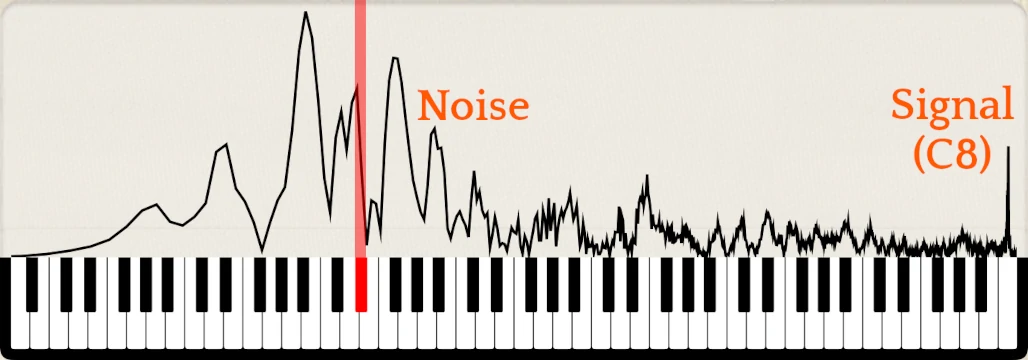 The peak from the note being played is tiny compared to the lower frequency peaks from the percussive action noise from the key strike. The tone of the note, from the app’s perspective, is being drowned out by the “thwack” of your finger hitting the key, the key hitting the bottom of the keybed, and the hammer ricocheting off the piano strings. The weak and quickly decaying signal amid all this extra noise makes it hard for PianoMeter to reliably detect that C8 is being played in the first place.
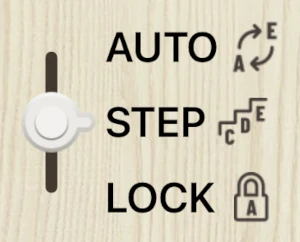
For this reason, I recommend that users change the note switching mode to “Stepwise” when tuning the top octave of the piano. That will keep PianoMeter’s automatic note switching from jumping out of the treble to lock onto the lower frequency peaks.
 It can also help to move the device that’s running PianoMeter closer to the note being played.
Another problem with the high treble notes is that their tone is not pure, but full of false beats and fast frequency modulations. Look at this zoomed-in view of the spectrum of note C8.
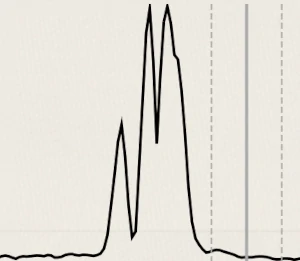
An ideal pure tone would be a single peak, but the actual spectrum shows messy peaks that are constantly evolving in shape and position and that are smeared across a roughly 20 cent range. That makes it very difficult for PianoMeter to display a stable reading when a note is “in tune”.
Also, the spinning strobe rings aren’t very useful for the highest notes unless you’re already close to the pitch.
To work around this, I recommend that you look primarily at the dial in PianoMeter and don’t spend too much time trying to get it perfect. Strike the note repeatedly and rapidly and take a mental average of the pitch.
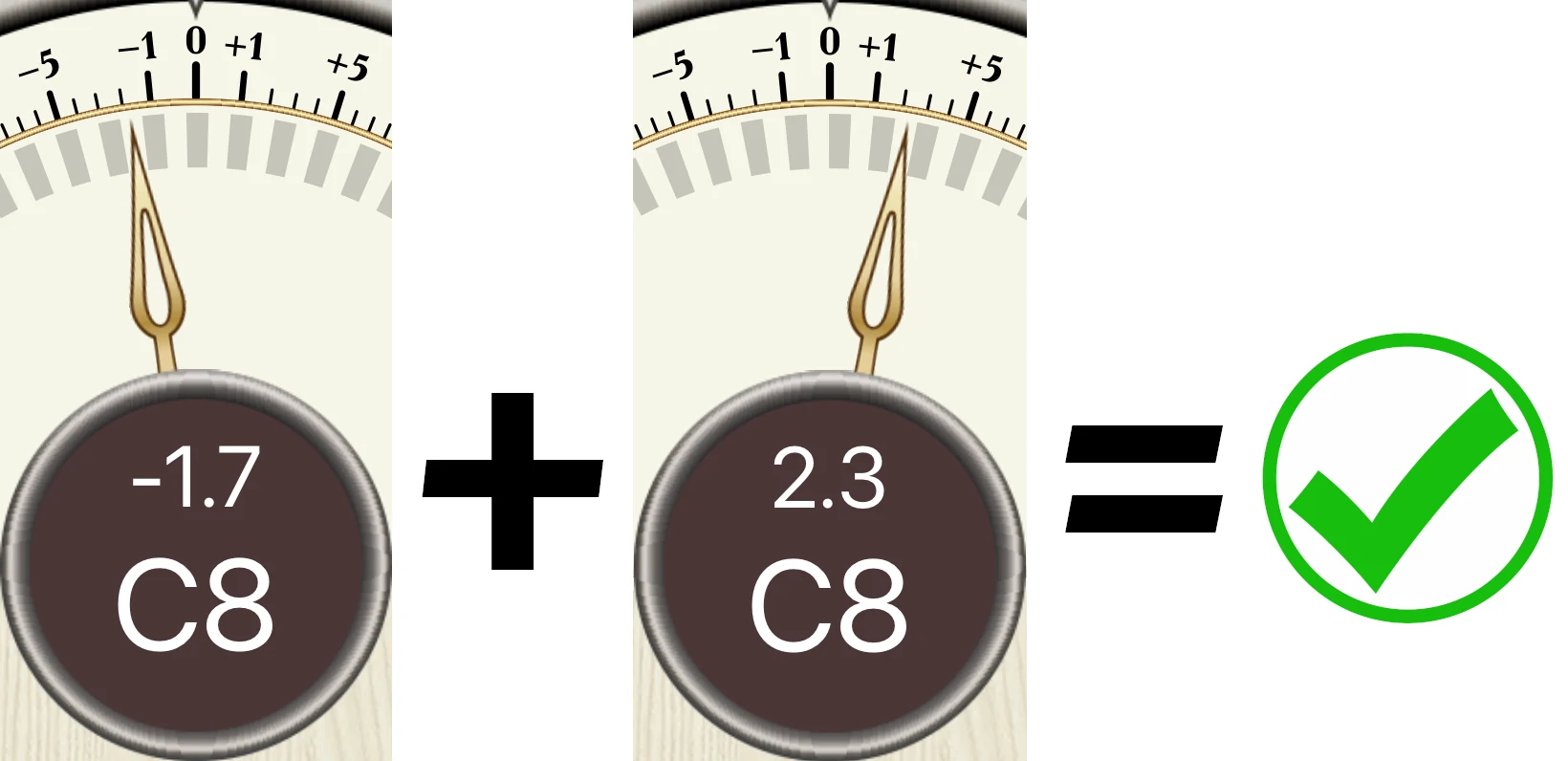
If the average is within a couple cents of zero, move on.
Is the cost of upgrading from Plus to Pro prorated?
Yes! If it costs $25 to upgrade to Plus and $300 to upgrade to Pro, then it will cost approximately $275 to upgrade from Plus to Pro. On Android, the cost of upgrading from Plus to Pro is prorated by the cost of Plus.
Why the rename from "Easy Piano Tuner" to "PianoMeter"
Two main reasons were:
- The name “Easy Piano Tuner” didn’t fit under the icon on most device screens, which usually only show up to 9 or 10 characters. It was showing up as “Easy Pia…”
- A large proportion of app downloads are in non-English speaking countries. When I started doing translations for localization I discovered that “Easy” didn’t translate well, and carried negative connotations in some languages (cheap, unsophisticated, etc.)
The name PianoMeter translates quite well, thanks to the Greek root μέτρον (métron) that means “measure”.
Why is the cost of the app so high/low?
I started tuning pianos regularly I was in college, and I remember the pain of having to pay around US$900 for a tuning app at a time when I could least afford it. For that reason I have tried to keep the cost of this app relatively low, and even added a lower-cost version with limited-functionality specifically for hobbyists and people starting out in the business.
Even so, I occasionally receive complaints (sometimes in the form of one-star reviews) asking why the app costs so much or even complaining that the full functionality it isn’t free. While I think most people realize that developers need to get paid for their work, I think there may be a disconnect on a few issues:
- The amount of time and money it actually takes to develop a quality app.
- How much more complicated a piano tuning app is vs. a generic guitar tuning app.
- How small the niche market is for a piano tuning app vs. other tuning apps.
- The amount of maintenance apps require to keep them from becoming obsolete on future generations of devices.
To give an idea of what this app took to develop, I started working on this as a “spare time” project in 2014, launched the app on Android in 2017 and iOS in 2020, and have been working on improvements, maintenance, and new features since then. Over the years I’ve poured thousands of hours and tens of thousands of dollars into the project.
That said, I realize $300 upfront is a significant expense, so I’ve also introduced an option for a yearly subscription for the Pro version.